

Considered updates ensure the Ultra remains top of the smartwatch pile
The Apple Watch Ultra 3 is a powerful evolution, solidifying its status as the best overall smartwatch money can buy. The larger, brighter display is a significant upgrade, while the addition of accessible and varied satellite-powered features provides a better safety net than rivals currently offer. Core tracking accuracy for GPS and heart rate remains among the industry's best, and the battery life sees a welcome (if not revolutionary) improvement. While it still lacks the deep training analysis of a dedicated sports watch, it masterfully strikes the balance between an accomplished sports tracker and a seamless smartwatch.
Pros
- Larger, brighter display is a superb upgrade
- Outstanding GPS and heart rate accuracy
- Satellite features are accessible and work smoothly
Cons
- Not an essential upgrade unless you crave satellite features
- Training analysis is still basic compared to rivals
- Battery life changes aren't transformative
After letting its premium, adventure-focused smartwatch simmer for two years, the Apple Watch Ultra 3 signals the line’s comeback.
Perhaps the gap between releases is Apple’s tacit admission that truly compelling hardware upgrades aren’t possible to deliver every single year—especially for a watch, like this, designed for longevity. But, in reality, it’s still unknown whether this marks the start of a new, more patient biennial update cycle for its best smartwatch line.
It’s also true that Ultra 3 isn’t a radical reinvention, either. Instead, it’s another considered evolution of the smartwatch that spearheaded the industry’s shift to more premium devices three years ago: one that straddles the line between a full-featured smartwatch and a serious sports tracker. It takes the winning formula of its two predecessors and refines it with a bigger, brighter display, (slightly) improved battery life, and the potentially life-saving addition of satellite connectivity.
This isn’t necessarily a watch designed to tempt Ultra 2 owners into an immediate upgrade. The changes, while significant, aren’t transformative in that way. But for those with an original Ultra, anyone currently using a standard Series model and craving more, or even those eyeing a switch from another ecosystem, the Ultra 3 presents a deeply compelling case. It reaffirms its position not only as the pinnacle of the Apple Watch lineup, but also as the best overall smartwatch money can buy. After six weeks of intensive testing, here’s our full verdict.
Price and competition
The Apple Watch Ultra 3 maintains the same $799 starting price in the US as its predecessor, cementing its position in the premium tier. Regional pricing adjustments exist, such as a slight tweak in the UK (reduced to £749), but the overall cost remains substantial.
As is inherent to the Apple ecosystem, its primary competition is internal. The decision for an iPhone user boils down to a choice: the accessible elegance of the Series 11, the rugged multi-day endurance of the Ultra 3, or the budget-conscious utility of the SE 3.
However, the Ultra’s distinct identity as a sporty smartwatch also places it in direct conversation with high-end sports watches. Its most natural rivals are premier picks like the Garmin Fenix 8 and 8 Pro (or the brand’s high-end Forerunners, such as the 970 and 570).
These competitors undoubtedly offer deeper training analysis and significantly longer battery life. Yet, none can match the Ultra 3’s seamless software experience, its vast app ecosystem, or its unrivalled integration with the iPhone.
This fundamental difference defines the Ultra’s unique position in the market: it’s the bridge between two worlds.
Design and display
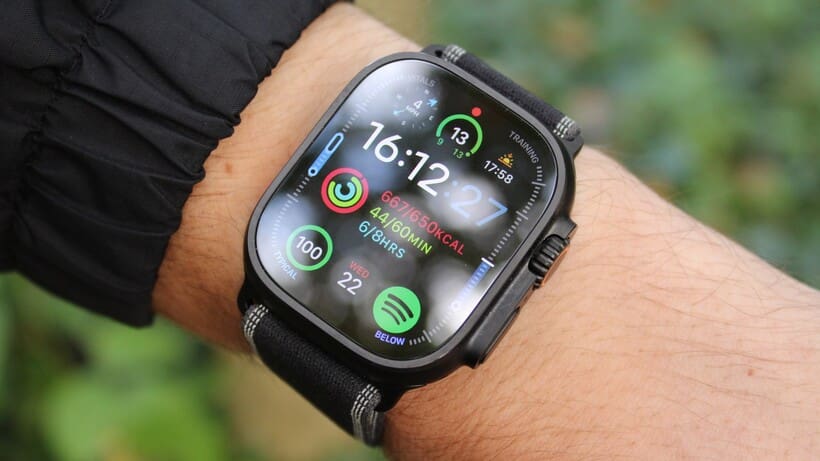
At first glance, the Ultra 3 could easily be mistaken for its predecessors. The distinctive and functional design language—the 49mm titanium case, the raised lip that protects the flat sapphire crystal display, and the customizable orange Action Button—remains unchanged.
We tested the Black Titanium case with the new black/charcoal Trail Loop. While sleek and the perfect complement to the updated, more edge-to-edge display, it also feels much less characterful than the Natural Titanium finish that has become synonymous with the Ultra line.
Looks are subjective (and I feel the consensus is that the black edition is preferred), so I won’t dwell on this too much. Instead, it’s the function that’s ultimately more important for a watch like this, and the core design continues to strike an excellent balance between rugged capability and surprising wearability.
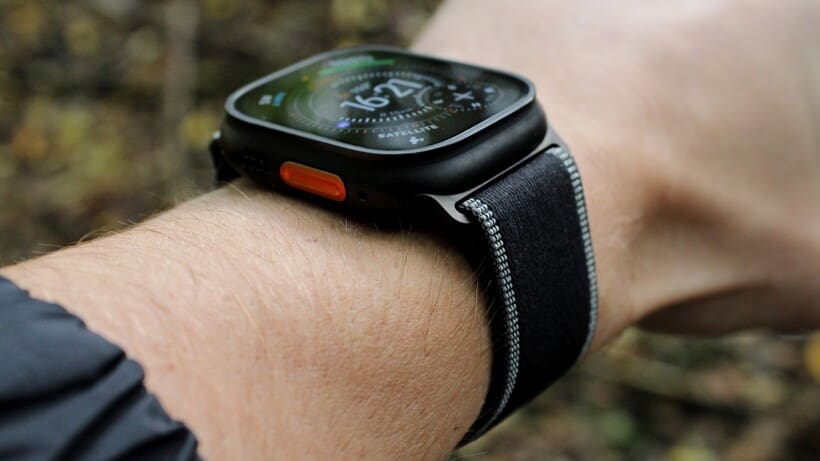
Despite its substantial size (and greater thickness than the Series devices), the Ultra 3 remains remarkably comfortable for 24/7 wear. It avoids the top-heavy feeling that can plague some larger sports watches during more dynamic activities like running, and it’s significantly more pleasant to wear during sleep tracking than bulkier rivals like the Garmin Fenix 8 Pro.
Pushing the boundaries
The most significant physical upgrade—and the one that had the greatest impact during our testing—is the display.
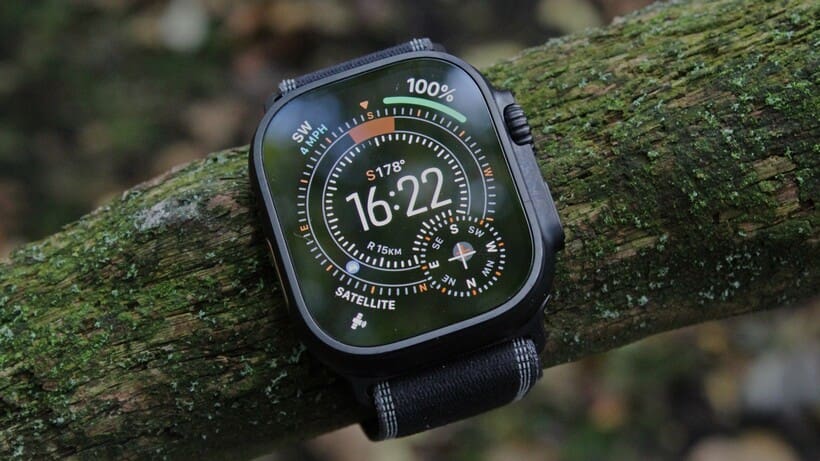
A characteristic seen in previous Series iterations, Apple has skillfully reduced the bezel size for the Ultra 3, increasing the active screen area by roughly 5% within the same 49mm chassis. I’ve spoken to some other tech reviewers who say they barely noticed this, which, as a long-term Ultra 2 user, baffles me; it’s a difference that’s instantly noticeable and substantial.
That extra real estate transforms the user experience. Text is presented more neatly, complications have more room to breathe, and watch faces like Modular Ultra or the new exclusive Waypoint face feel significantly more expansive and data-rich.
It’s the kind of subtle but impactful change that, once you’ve lived with it, makes it difficult to go back to the previous generation. The increased screen size, combined with the fluid animations of watchOS 26 and the ability for watch faces to show a ticking second hand even in the dimmed always-on state, makes the Ultra 3 feel more alive and responsive than ever.
Apple has also incorporated an updated LTPO3 panel and wide-angle OLEDs. This improves off-axis viewing angles, making the display clearer when glanced at from the side. Again, it’s subtle, but it’s actually surprisingly handy when, for example, getting more detailed info from the dimmed always-on workout screens.
Smart features and watchOS 26
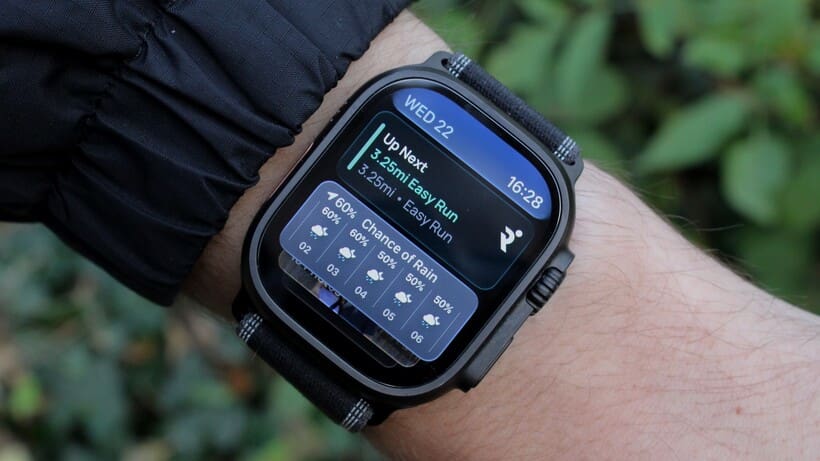
The software experience on the Ultra 3 is largely the same as on the other 2025 models (and other Apple Watch devices compatible with the latest software), running on the excellent watchOS 26.
As I wrote in our Apple Watch Series 11 review, this is where the Apple Watch ecosystem truly flexes its muscles.
The deep, frictionless integration with the iPhone remains unparalleled. Apps like Strava and Runna perform flawlessly, music and podcast streaming is effortless (a stark contrast to the sometimes glitchy experience on other platforms), and system-level features operate with a polish that is simply unmatched.
The smarter, more context-aware Smart Stack (enhanced this year by Apple Intelligence), surfaces relevant information intuitively, reinforcing the watch’s role as a central hub for your digital life.
And while the iOS implementation has been panned in some circles, we’re huge fans of the new Liquid Glass design language. For our money, it provides a neat aesthetic across the watch ecosystem at the very least—but the shared look and feel does really contribute to the Ultra 3 feeling like an extension of the iPhone.
Satellite: A potentially life-saving connection
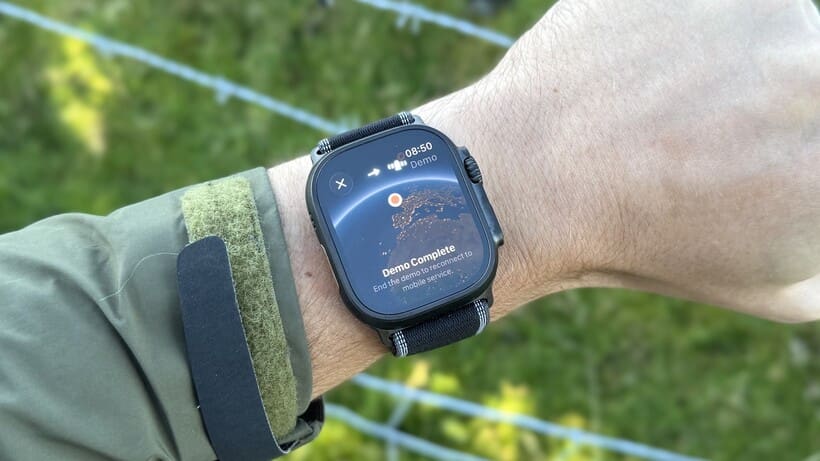
The major new exclusive feature of the Ultra 3 is satellite connectivity. On paper, it’s the single biggest upgrade offered for this generation, providing a robust safety net previously available only via dedicated satellite communicators (like Garmin’s inReach) or recent iPhones.
We’ve seen this feature popularized on the wrist in 2025, with interpretations also coming via the Google Pixel Watch 4 and Garmin Fenix 8 Pro. However, with each of these brands offering a different blend of setup (i.e, subscription add-on vs. packaged with cellular, like the Ultra 3), requirements, and features, it’s actually worth running through exactly what you can (and can’t) do with satellite functionality on the Ultra 3.
Leveraging LEO (Low Earth Orbit) satellites, the Ultra 3 can facilitate three key functions when you are completely off-grid without cellular or Wi-Fi signal:
- Emergency SOS: This connects users directly with emergency services through a guided questionnaire and is included free for two years (and doesn’t require an active cellular plan)
- Satellite text messaging: Send and receive iMessage or SMS texts to designated contacts. This requires an active cellular plan on the watch and is currently available only in the US, Canada, and Mexico (meaning we couldn’t test it for this review)
- Find My location sharing: Manually update your location to Apple’s Find My network every 15 minutes (requires an active cellular plan)
Gimmick or gamechanger?
During our testing, finding a true satellite-only zone proved challenging, even in remote areas of Eryri National Park (Snowdonia) in Wales. Thankfully, during that time, we didn’t require a satellite-powered Emergency SOS, though we did complete several demos of the tech (as shown above).
As mentioned above, the satellite messaging feature unfortunately remains limited to North America, so we’ll have to revisit it as it expands (hopefully in 2026).
However, the potential usefulness here is undeniable. For hikers, trail runners, or anyone venturing into areas with unreliable service, the ability to call for help or send a crucial message directly from the wrist—even without a phone—offers incredible peace of mind.
It’s not something I’d personally rely on as a sole solution, but it undoubtedly has a future as part of a broader package to help keep you safe in the outdoors.
For example, Garmin’s inReach system offers more features and reliability regarding battery life, but it comes with a significant subscription cost. Apple’s integration, particularly the free SOS component, makes this vital safety technology far more accessible.
Crucially, by nature, this is also always attached to your body. There are ways to attach satellite devices like inReach, but plenty of experienced outdoorspeople we’ve spoken to during testing have admitted their device is often stashed at the bottom of a rucksack. Not ideal if you end up in an emergency—but not a problem if it’s on your wrist.
Health features and sleep tracking
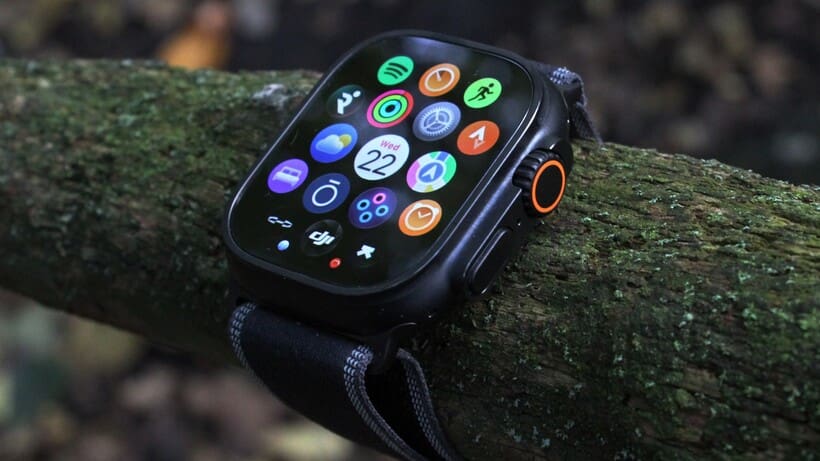
The Ultra 3 benefits from the full suite of new health features introduced with watchOS 26, mirroring the capabilities of the Series 11.
These additions build upon an already comprehensive health monitoring platform that includes ECG, SpO2, skin temperature sensing for cycle tracking, Fall Detection, Crash Detection, and sleep apnea alerts.
Passive hypertension notifications are the headline act, silently monitoring cardiovascular signals for signs of chronic high blood pressure. Like satellite functionality, it’s a potentially life-saving feature indicative of Apple’s continued push into proactive, preventive health. Notably, though, it’s also available on other recent Apple Watch models, not just the 2025 family.
Apple has also finally introduced its own take on a Sleep Score. It avoids the pitfalls of relying heavily on unreliable sleep-stage data and instead calculates the score based on more robust metrics: sleep duration, consistency, and interruptions.
While it might lack the granular detail craved by data-obsessed users, it provides a simple, trustworthy, and actionable assessment of nightly rest. This cautious, user-friendly approach is typical of Apple – prioritizing mass-appeal usability over potentially inaccurate deep dives into data. It’s not what I personally prefer in a wearable, but I can understand Apple’s reluctance to overwhelm in these areas.
GPS tracking: A laser with a single remaining quirk
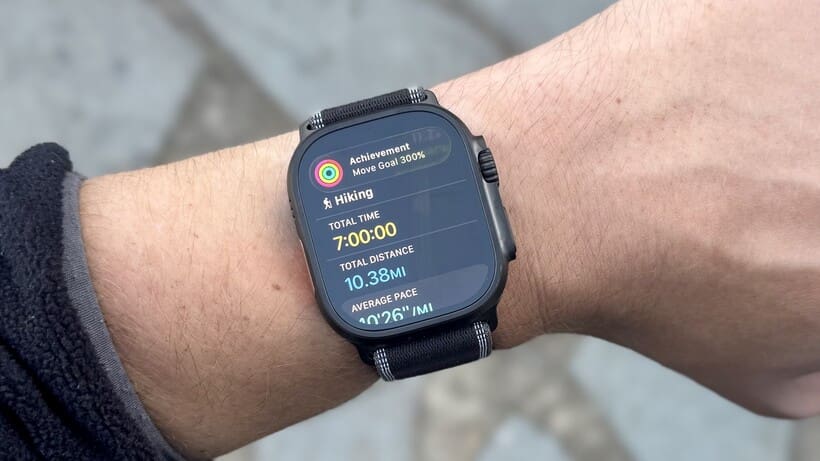
The Apple Watch Ultra has always punched above its weight in sports tracking, offering accuracy that rivals dedicated sports watches, even if its native analysis tools remain relatively basic.
The insights may fall short compared to other dedicated options—even with bustling app support—but the Ultra 3 continues the tradition of delivering what is arguably the best all-round tracking accuracy available.
Plot points
The Ultra 3 retains the excellent dual-frequency GPS system of the first two generation, and its performance remains exceptional.
In extensive testing alongside the Garmin Fenix 8 Pro (generally using its Multi-Band setting), the Ultra 3 consistently produced GPS tracks that were incredibly clean and precise.
It hugs corners tightly and shows minimal drift, often appearing more accurate to the proper path than even the Garmin. I’ve tested the Ultra 3 in the relatively challenging conditions of double-sided city streets of Paris on race day, in the mountains of Wales, and in admittedly easier tests on open-air coastal runs. It has answered the call in essentially every circumstance.
It trounced the Garmin Fenix 8 Pro on a 10-mile hike in the mountains, clinging onto every twist, turn, and pit stop pause for more than 10 hours.
Now, admittedly, the Garmin was operating in its most efficient UltraTrac mode, set by default for hiking—but I’ll explain in the battery life section why this is actually a fair comparison.
The Garmin, as shown above, couldn’t help but get confused throughout the hike and sometimes took mega detours after the signal pinged off a nearby peak, leading to a 2.5-mile discrepancy overall. You can view the whole trail in detail here to get a true sense of the comparison.
The city race test
However, Apple’s GPS philosophy still differs slightly from Garmin’s and other smartwatches.
Essentially, the Ultra 3 refuses to “guess” when it loses signal. And that means it can, depending on your route, often underreport distance compared to other devices.
We saw this clearly during the 20km race in Paris, shown below, which included two road tunnels (totalling 0.55km) along the Seine. Garmin, Google, and Samsung, by comparison, accounted for the estimated distance through the tunnels, leading to the total distance tracked calculated just under the 20.5km mark.
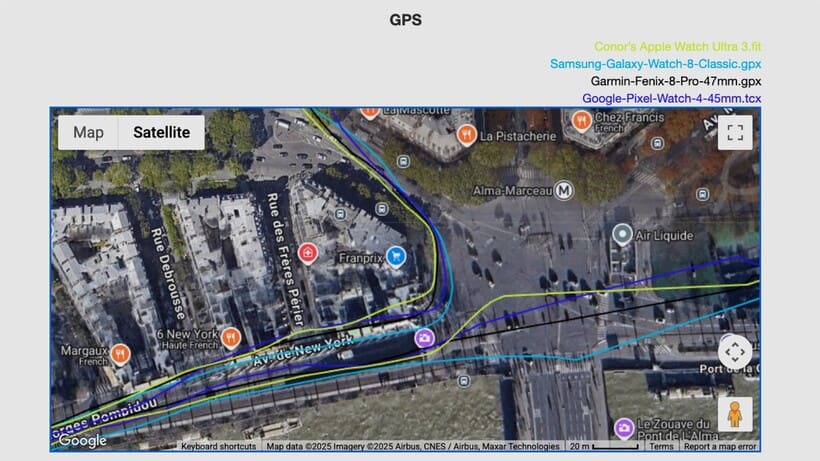
That’s likely in the right ballpark, of course, given that you always over-run the actual distance in events like this. However, the Ultra 3 plotted greyed-out points between entry and exit of those tunnels, resulting in a shorter overall distance logged—19.81km.
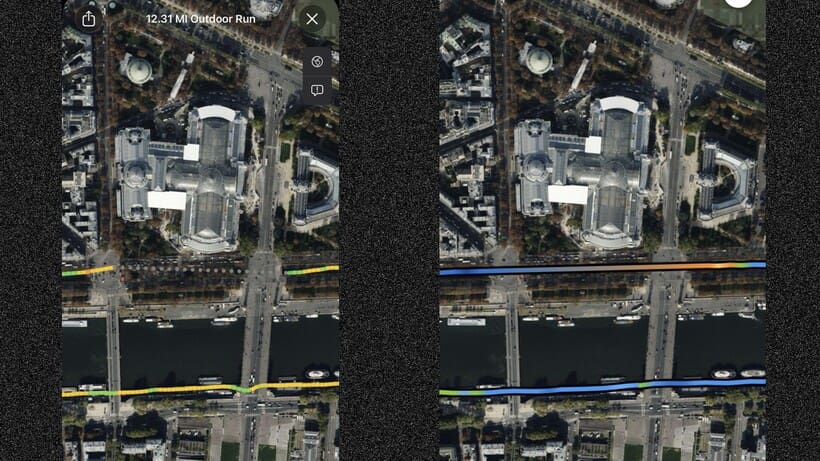
This is only viewable in the Apple Fitness app—analyzer tools and platforms like Strava can sometimes smooth this track. Yet, the example above (you can view the complete comparison here) shows how well all these tracks overlap.
As such, once you add in the missing distance from those two tunnel sections, it’s easy to determine that the Ultra 3 performed very well around the streets of Paris. But, again, it remains a quirk.
The bottom line
In our experience with Apple’s dual-frequency tech since the Ultra launched, it offers relatively unparalleled stability when the signal is present. Even the best GPS trackers will have issues in skyscraper-village environments—and it can be frustrating, in some respects, that Apple leaves the door open to significant tracking dead spots.
Again, though, for pure fidelity in easy and more challenging conditions, the Ultra 3 is right alongside Garmin’s Multi-Band tech as being the gold standard. Depending on the day and settings you have locked in, it can also come out on top—something we found in both the Welsh mountains and in our Garmin Multi-Band vs. Apple Watch Ultra test at the Chicago Marathon in 2022.
Another key point here is the simplicity of its operation; there are no complex modes to fiddle with on race day, or to worry about optimizing manually for different environments.
Heart rate tracking: Class-leading (with a new backup)
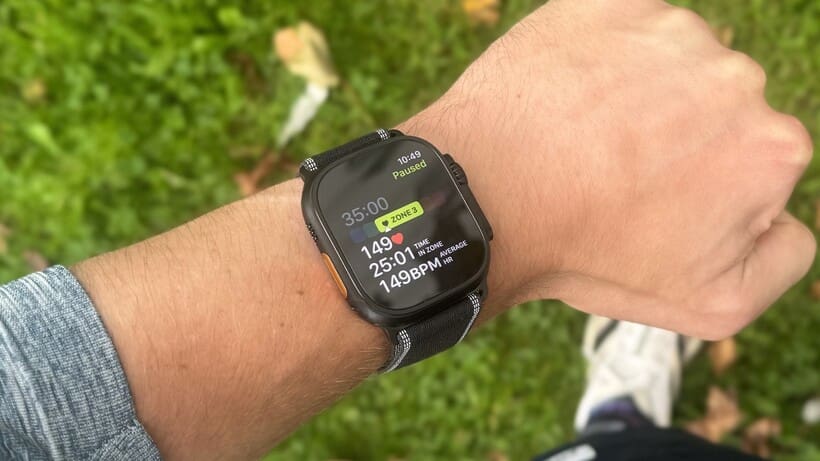
The optical heart rate sensor on the Ultra 3 remains, in our opinion, the most reliable and accurate available from the wrist. It consistently matches the performance of a chest strap, even during the most demanding high-intensity interval workouts.
Where many optical sensors struggle with latency or smoothing out rapid changes, the Ultra 3 captures sharp peaks and recovery troughs with remarkable accuracy. I’ve thrown every kind of session at it during our extensive testing time, and, just like with GPS, it almost always responds.
Now, no wrist-based optical sensor is without issue. Apple’s devices, like others, are still susceptible to dropouts in cold, moist conditions. Yet these occasions are still uncommon compared to rivals—and, like with GPS dips, I do appreciate it when the heart rate sensor buffers rather than guesses. This means session averages (at least when tracking in Workout/viewing in Apple Fitness) are never skewed by rogue spikes.
On race day
In the same Paris 20km race as detailed above, we tested the Ultra 3 against three other top wearables: the Whoop MG on the bicep, the Garmin HRM 600 on the chest, and the Samsung Galaxy Watch 8 Classic on the opposing wrist.
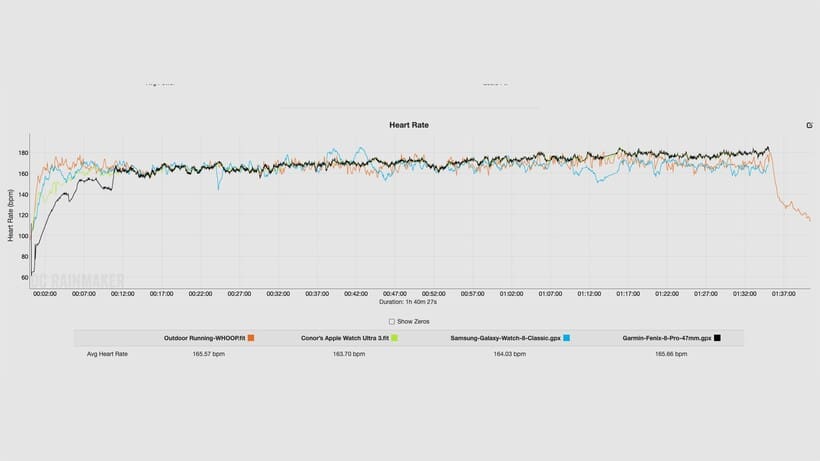
Full race HR comparison graph — (Image credit: Wareable)
All ended up with similar session averages, but the full graph (which you can view a dynamic version of here) shows a different story. Each had a very different interpretation in the first 10-15 minutes of the race, at which point things evened out somewhat as HR figures steadily increased throughout the race.
We can see the Galaxy Watch 8 Classic suffer countless erratic spells, with Whoop also not totally hanging in there against the chest strap and Ultra 3 (its session average is also skewed by poor cropping in its auto-detect feature at the end of the race).
The Ultra 3, though, was effectively beat-for-beat with the chest strap, except for that first section (again, where none of the devices agreed).
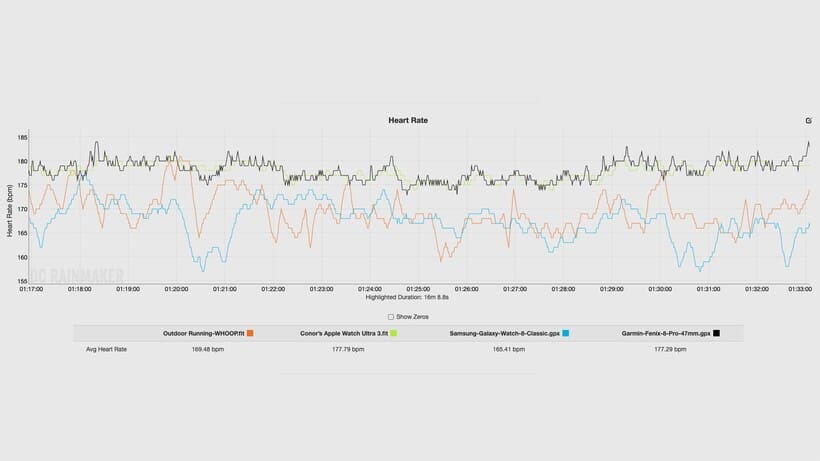
This is a little tricky to see in the wide-angle view of the whole session, but focusing in on the last 15 minutes of the race (above) shows just how impressively it matches the chest strap. The two are only averaging 0.5BPM different over this period(!)—and it’s pretty much like this the entire race.
For full clarity—and, again, viewable on the links out to the graph—the HRM 600 did also have one or two minor drop-outs (you can see this on the straight-line jumps between readings), whereas the Ultra 3 had none.
The perfect backup: AirPods Pro 3
However, suppose even that isn’t enough to satisfy your craving for graph-perfect data. Again, optical sensors aren’t flawless every time.
In that case, you can now boost the Ultra 3’s sensor with the new heart rate-monitoring capabilities of the AirPods Pro 3. In my experience testing the two devices in tandem in workouts over the last six weeks or so, this essentially ensures you’ll never have dead spots in your data.
I actually experienced the perfect example of this when comparing the combination of these devices to an Ultra 2 on the opposing wrist (and the HRM 600 strap connected to a Fenix 8 Pro).
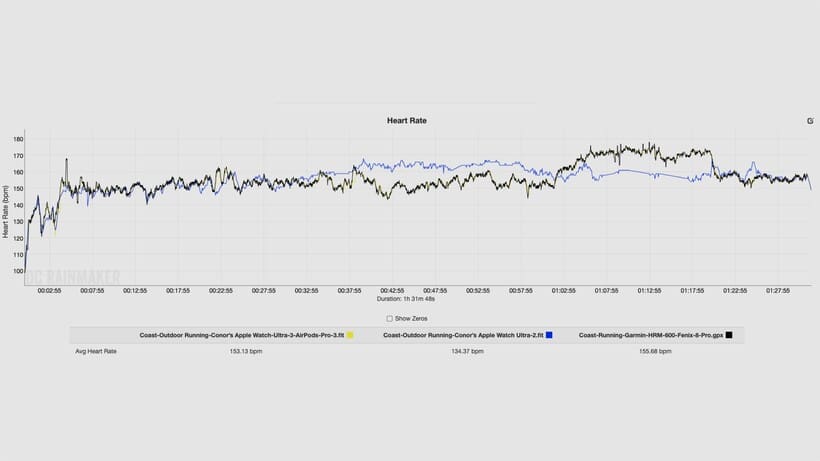
As shown above (access the dynamic, full graph here), the Ultra 2 (remember, with the same optical sensor as the Ultra 3) had an uncharacteristically terrible day—likely due to a poor fit on my right wrist and some inclement weather.
At the same time, the Ultra 3 and AirPods Pro 3 matched the HRM 600 pretty much throughout (save for self-imposed hiccups at the beginning).
It’s still early days for this pairing. However, based on lots of initial testing, I feel very comfortable saying that those who demand elite accuracy should consider the (far more comfortable) combination of an Apple smartwatch and AirPods Pro 3 as a serious alternative to a chest strap.
I’ll save the true deep-dive on that for our full AirPods Pro 3 review.
Battery life
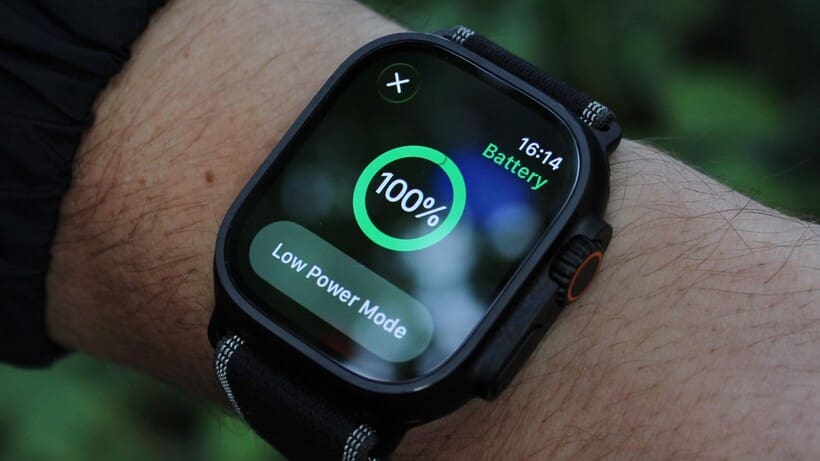
Apple officially increased the battery life estimate for the Ultra 3 to 42 hours of regular use, up from 36 hours on the Ultra 2. However, similar to the adjustment made for the Series 11, this new figure incorporates six hours of sleep tracking into its calculation, unlike the previous 36-hour estimate.
So, is the battery life genuinely better? Yes, but perhaps not to any consistently discernible level—and definitely not by the full six hours of daytime life that’s implied.
The Ultra 3 remains a solid 2-3 day watch under what we would class as everyday use, cementing its advantage over the Series line’s daily charge routine. It provides a level of freedom and reliability that fundamentally changes the user experience.
Our testing consistently demonstrated its impressive endurance. Coming back to the all-day hike in Snowdonia with continuous GPS tracking, the watch finished the day with around 50% battery remaining – easily lasting through the night and well into the next day without needing a charge.
For reference, the Garmin Fenix 8 Pro (running LiveTrack throughout) finished on the same battery level after both started on 100%, which is astounding.
Pushing the limits
On lighter days with shorter workouts, pushing towards the 60-hour mark (two and a half days) is easily achievable. And on back-to-back rest days where I’ve not moved much from my desk and haven’t raised my wrist much, I’ve seen the watch only lose 25-30% in total.
So, if you’re a very light user and crave the Ultra 3 for the aesthetics alone, I think you could conceivably track three nights of sleep before requiring a recharge.
While it doesn’t reach the 5-10-day territory of dedicated endurance watches like a Garmin Fenix or Enduro 3, the Ultra 3’s battery life is more than sufficient for a long weekend of adventure or several days of reasonably heavy use.
It’s just enough to strike the right balance between capability and longevity, solidifying its position as a truly reliable multi-day smartwatch. The charging routine becomes a top-up affair or 0-100 reboot every few days rather than a daily necessity, which, for many (including myself), is the Ultra’s most liberating feature.